Facts verified against RouteWave 2.4.0 on 2026-10-30.
The RouteWave console (Ctrl+J) runs commands such as value, cursor, zoom_raw and note. The same command table serves three other entry points: routewave_cli -c without a window, a WCP connection to an open window, and routewave -c or -e at start. Commands that read state print one fact per line, with no decoration, so a script or an agent parses the output directly.
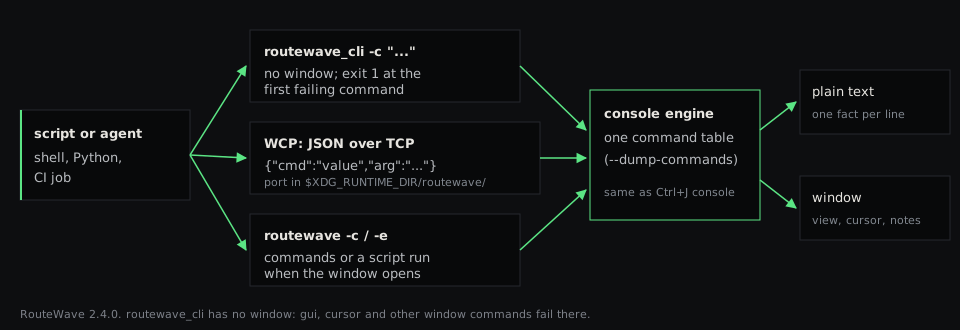
Entry points
| Entry point | Window | Use | Failure signal |
|---|---|---|---|
routewave_cli -c "<cmd>; <cmd>" | None | Queries on a wave file: values, edges, bounds, source map | Exit code 1 at the first failing command |
| WCP, JSON over TCP | Open | Drive and read back a window a person is looking at | Error text in output (see Items to confirm) |
routewave <wave> -c "<cmds>", -e <script> | Opens | Set up a view at start | Message in the console |
routewave_cli has no window: cursor, gui and the other window commands fail there.
Headless queries
The example wave is pulse_counter.fst: an 8-bit counter cnt that counts six pulses on pulse_in.
$ routewave_cli -c "open pulse_counter.fst; bounds; value pulse_counter.cnt 400; edges pulse_counter.pulse_in"
Loaded 8 channel(s) from 'pulse_counter.fst'.
Source map: 8 signal(s) from 'pulse_counter.srcmap.json' (whereis <signal>).
0 395
0x6
12
| Command | Output |
|---|---|
bounds | First and last time of the trace in ns |
value <signal> <ns> | Value at that time, in the signal's radix |
edges <signal> | Number of value changes |
A failing command ends the run with exit code 1, so a shell or CI step stops on it:
$ routewave_cli -c "open pulse_counter.fst; value pulse_counter.nosuch; bounds"
...
Signal not found: pulse_counter.nosuch
Error: command failed: value pulse_counter.nosuch
$ echo $?
1
An open window over WCP
The RouteWave window starts a WCP server. Without --port, it listens on an ephemeral port on 127.0.0.1 and writes the port number to $XDG_RUNTIME_DIR/routewave/<pid>.port (Linux and macOS). --port <N> listens on all interfaces; --no-wcp turns the server off.
A request is one line of JSON, {"cmd": "<command>", "arg": "<arguments>"}. The reply is one line, {"status": "ok"}, with an output field when the command printed text.
import glob, json, socket

port = int(open(glob.glob("/run/user/1000/routewave/*.port")[0]).read())

def wcp(cmd, arg=""):
    with socket.create_connection(("127.0.0.1", port)) as s:
        s.sendall((json.dumps({"cmd": cmd, "arg": arg}) + "\n").encode())
        return json.loads(s.makefile().readline())
/run/user/1000 stands for the value of $XDG_RUNTIME_DIR. The session below set the view, moved the cursor and added a note; each reply is shown after its request:
| Request | Reply output |
|---|---|
zoom_raw 60 260 | (none) |
cursor set 130 | (none) |
value pulse_counter.cnt | 0x2 |
measure pulse_counter.pulse_in | pulse_in: Width = 20 ns, Period = 50 ns, Freq = 20.00 MHz, Duty = 40.0% |
note add cnt[7:0] 130ns second pulse counted | n1 note 130ns pulse_counter.cnt[7:0] - - default 100 open second pulse counted |
view get | 60 260 |
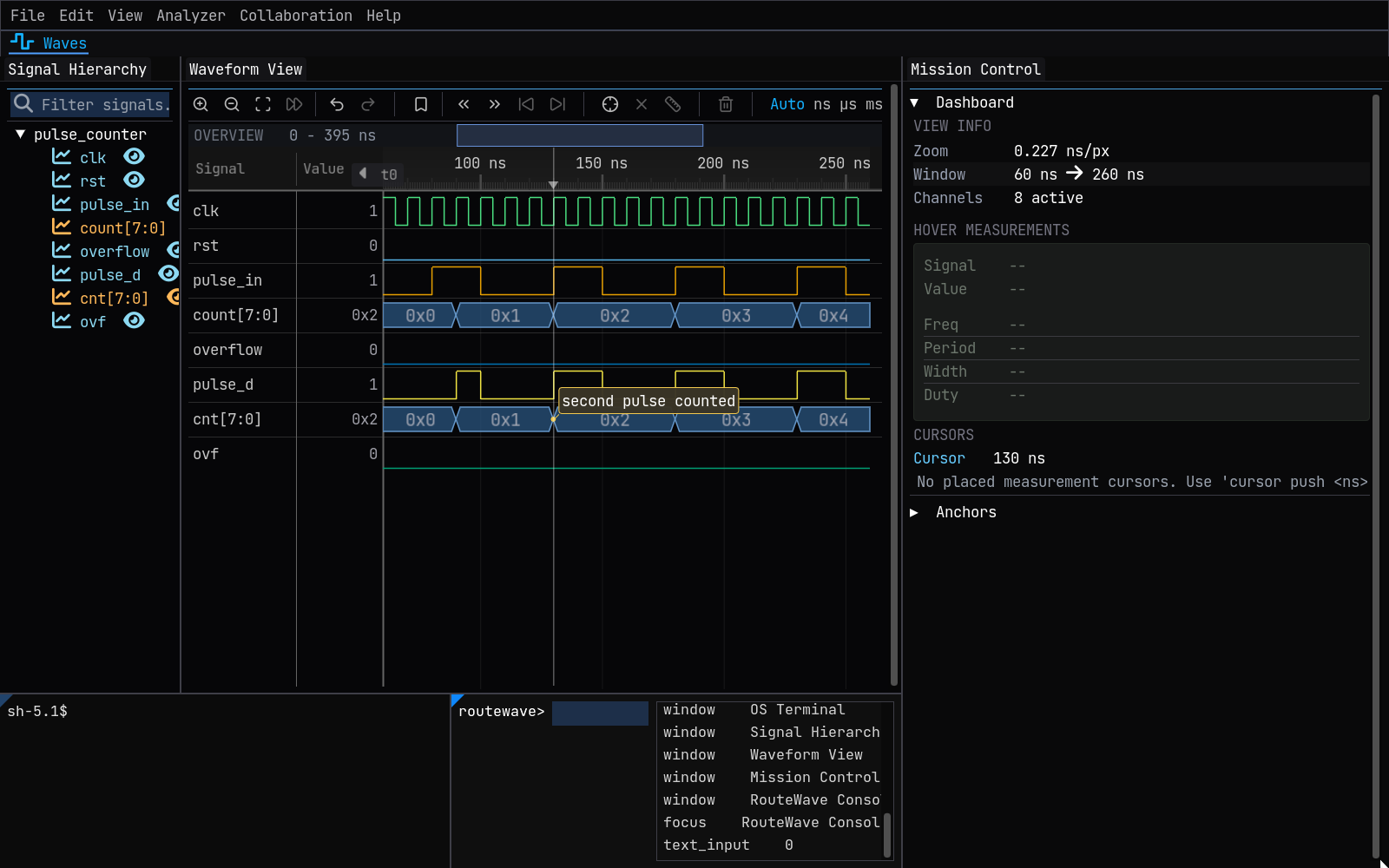
Reading the window back
gui state prints one tab-separated line per open window, with its position and size in pixels, then the focused window and whether a text field has the keyboard:
window	OS Terminal	0,800,518,200
window	Signal Hierarchy	0,65,207,733
window	Waveform View	209,65,829,733
window	Mission Control	1040,65,560,935
window	RouteWave Console	520,800,518,200
focus	RouteWave Console
text_input	0
signals lists the shown rows as <id> <name> <radix>; view get and cursor get return the view and the cursor in ns. Together they let an agent check that a command had the effect it expected.
The command table
routewave_cli --dump-commands prints every console command as JSON, one object per command:
{"cmd": "value", "cat": "Navigation", "syn": "value <signal> [<ns>]",
 "desc": "Print the formatted value of a signal at the focal cursor (or a given time), per its radix. Bare value, for scripting.",
 "ex": "value axi_wdata"}
An agent reads this table instead of the documentation. commands prints the same list in the console.
Items to confirm
| Item | Observation |
|---|---|
| WCP status of a failing command | In 2.4.0, value nosuch over WCP replied {"status": "ok", "output": "Signal not found: nosuch"}. A WCP client checks output for the error text; status alone does not show the failure. |
record and exec | Taken from the command table; not run for this article. |
| Windows | The port file is not written on Windows; --port <N> is the way to reach the server there. Not checked on a Windows build for this article. |